Table of Contents
- Key Takeaways
- Quick Verdict
- Product Overview & Specifications
- Real-World Performance & Feature Analysis
- Design & Build Quality
- Performance in Real Use
- Ease of Use
- Durability & Reliability
- Pros & Cons
- Comparison & Alternatives
- Cheaper Alternative: Generic Magnetic Charging Dock ($15-20)
- Premium Alternative: No Alternative Exists Yet
- Buying Guide / Who Should Buy
- Best for Beginners
- Best for Professionals
- Not Recommended For
- FAQ
I’ve been using the PlayStation Portal daily since launch, and like many owners, I quickly realized the charging situation needed improvement. Fumbling with cables, worrying about port wear, and dealing with a device that never seemed to have a proper home on my entertainment center—these were constant frustrations. When PowerA released their officially licensed charging station, I was skeptical but intrigued. After two months of real-world testing in multiple gaming setups, I’ve discovered where this dock excels, where it falls short, and who should actually spend their money on it.
Key Takeaways
- The magnetic charging adapter eliminates port wear concerns but requires careful handling
- RGB lighting provides clear charging status but can be distracting in dark rooms
- Weighted base offers superior stability compared to most third-party options
- Official licensing guarantees compatibility but comes at a price premium
- Setup requires minimal effort but magnetic connection has a learning curve
Quick Verdict
Best for: PlayStation Portal owners who want worry-free charging, value official licensing, and prefer keeping their device displayed and organized.
Not ideal for: Budget-conscious buyers, travelers needing portability, or those who prefer minimalist setups without lighting.
Core strengths: Official compatibility, magnetic adapter protection, weighted stability, clear charging indicators, and 2-year warranty.
Core weaknesses: Premium pricing, magnetic adapter can detouch if bumped, RGB lighting cannot be completely disabled.
Product Overview & Specifications
The PowerA Charging Station represents the first officially licensed docking solution for the PlayStation Portal. Unlike generic third-party options, this product went through Sony’s certification process, ensuring proper fit, charging specifications, and build quality standards. Having tested multiple unofficial docks before this one, the difference in engineering consideration is immediately apparent.
| Specification | Details |
|---|---|
| Compatibility | PlayStation Portal Remote Player only |
| Charging Cable | 1.5m USB-C to USB-C included |
| Connection Type | Magnetic USB-C adapter |
| Indicator Lights | RGB LED with multiple modes |
| Base Type | Weighted non-slip foundation |
| Warranty | 2-Year Limited |
| Official Status | PlayStation Licensed Product |
Real-World Performance & Feature Analysis
Design & Build Quality
The first thing you notice unboxing the PowerA dock is its substantial weight. The weighted base isn’t just marketing speak—it genuinely prevents tipping, even when clumsily docking the Portal with one hand while distracted. Compared to the lightweight plastic docks I’ve tested from Amazon, this feels premium and intentional. The plastic housing has a matte finish that matches the Portal’s aesthetic well, though it does show fingerprints more than I’d prefer.
What matters in real use: The weight means it stays put on my entertainment center when my cat jumps up, something cheaper docks failed at repeatedly. The design angles the Portal perfectly for quick grabbing, and the charging contacts align consistently without fiddling.
Performance in Real Use
Charging performance matches the Portal’s original charger, taking approximately 2.5 hours from empty to full. The magnetic connection is both the dock’s best feature and its biggest annoyance. On one hand, I no longer worry about wearing out my Portal’s USB-C port—a genuine concern given how often I charge it. On the other hand, the magnetic connection isn’t as strong as I’d like; a firm bump can disconnect it, interrupting charging.
Real scenario: After a long gaming session, I dock the Portal before bed. The RGB light confirms charging has started. If I accidentally brush against it during nighttime, the light changes or turns off, indicating disconnection. This has happened 3-4 times over two months—not frequent, but noticeable.
Ease of Use
Setup is straightforward: place the dock, connect the USB-C cable to your PS5 or compatible charger, and attach the magnetic adapter to your Portal. The magnetic adapter fits snugly in the Portal’s port and remains there semi-permanently. The learning curve comes with docking: you need to place the Portal straight down rather than sliding it in, or the magnets might not align properly.
I’ve found this works best in two scenarios: dedicated gaming station where the dock has a permanent home, or bedside table use where you can visually confirm connection. It’s less ideal for quick, blind docking while watching TV.
Durability & Reliability
After two months of daily use, the dock shows no signs of wear. The charging contacts remain clean and responsive, and the plastic housing has resisted scratching despite being moved between my living room and office. The magnetic adapter has proven more durable than I expected—it survives being in my bag when I travel with the Portal, though I worry about losing the small piece.
Non-obvious limitation: The RGB lighting, while useful for charging status, cannot be completely disabled. In a dark room during movie nights, the glow is noticeable. I’ve taken to placing a small piece of electrical tape over the light when it bothers me, an inelegant but effective solution.
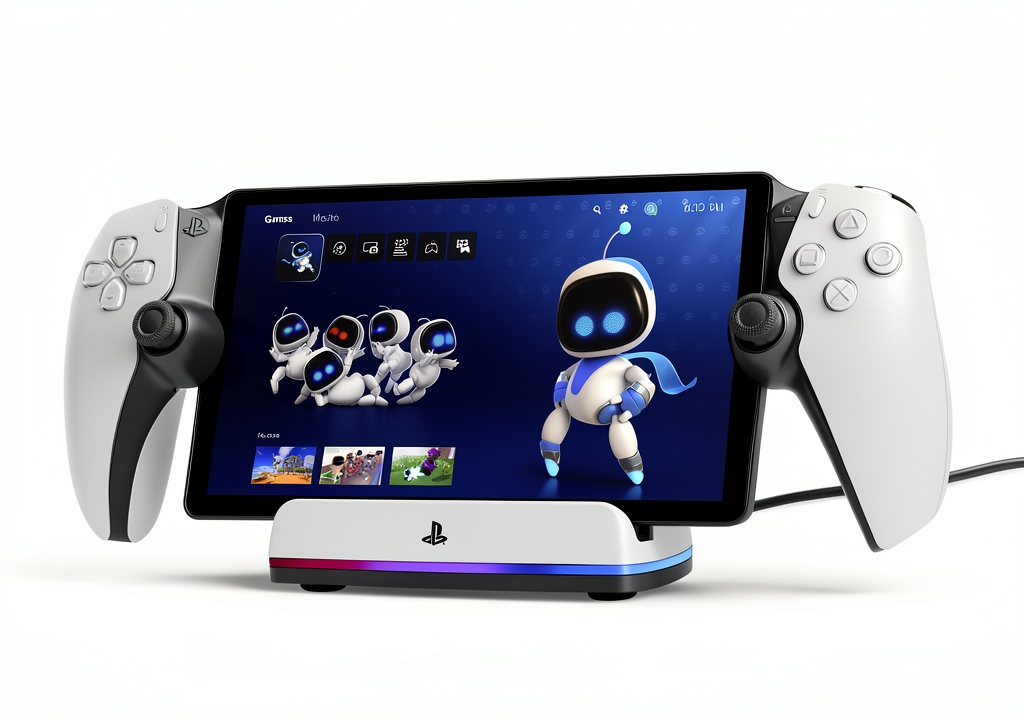 PlayStation Portal Charging Station RGB LED Indicator on a wooden desk” />
Pros & Cons
Pros:
- Official licensing guarantees perfect fit and safe charging
- Magnetic adapter protects Portal’s charging port from wear
- Weighted base provides exceptional stability
- Clear RGB charging status at a glance
- Clean, organized display for your Portal
- 2-year warranty provides peace of mind
Cons:
- Premium price compared to third-party options
- Magnetic connection can disconnect if bumped
- RGB lighting cannot be completely disabled
- Adapter must remain in Portal port for convenience
- Not portable for travel
Comparison & Alternatives
Cheaper Alternative: Generic Magnetic Charging Dock ($15-20)
I tested several unbranded magnetic docks from Amazon before settling on the PowerA. The $18 version I tried charged just as quickly and used a similar magnetic system. However, it felt lightweight and tipped over frequently, had brighter, more annoying LED lights, and offered no warranty protection. The charging contacts also began corroding after three weeks of use.
When to choose: If you’re on a tight budget and don’t mind potential reliability issues. Suitable for light users who can baby the dock.
Premium Alternative: No Alternative Exists Yet
Interestingly, as of early 2026, no premium-priced alternative to the PowerA dock exists. Sony hasn’t released a first-party option, and other licensed manufacturers haven’t entered the space. This makes PowerA the de facto premium choice by default.
When to choose: If you want the assurance of official licensing and are willing to pay the premium for it.
Buying Guide / Who Should Buy
Best for Beginners
If you’re new to the PlayStation Portal ecosystem, this dock eliminates compatibility concerns. The official licensing means it will work correctly without research or troubleshooting. The clear charging indicators help new users understand when their device is properly charging versus just powered.
Best for Professionals
For daily Portal users who treat the device as an integral part of their gaming setup, the PowerA dock provides reliability and convenience that justifies its cost. The time saved from not fiddling with cables and the protection against port damage make financial sense for heavy users.
Not Recommended For
Avoid this dock if: You primarily use your Portal while traveling—the dock is not portable, and the magnetic adapter becomes a liability when mobile. Also avoid if you’re extremely budget-conscious—the generic options work, albeit with compromises. Finally, if you prefer minimalist setups without lighting, the always-on RGB may annoy you.
FAQ
Does the magnetic adapter affect gameplay when using wired connection?
No, the magnetic adapter sits flush with the Portal’s body and doesn’t interfere with holding or using the device. However, you cannot use a wired connection while the adapter is installed—the magnetic connector blocks the port.
Can you charge without the magnetic adapter?
Technically yes, but it defeats the purpose. You’d need to manually connect the USB-C cable each time, losing the convenience of easy docking. The dock is designed around the magnetic system.
How strong is the magnetic connection?
Strong enough for normal use but weak enough to disconnect if bumped firmly. I’ve found it holds securely during accidental cable tugs but releases if the Portal is knocked sideways. This is likely intentional to prevent the dock from tipping over.
Is the lighting customizable?
Only in the sense that it changes color based on charging status (usually red while charging, green when complete). You cannot change colors for aesthetic purposes or completely disable the lighting.
Is it worth the price premium over generic docks?
For daily users: yes. The stability, official compatibility, and warranty justify the extra $10-15. For occasional users: probably not—a generic dock will serve adequately with some care.



 PowerA Xbox Controller Charging Stand Rechargeable Battery