Table of Contents
You’ve just finished a marathon Mario Kart session when the dreaded low battery warning appears. Now you’re staring at four drained Joy-Cons, wondering how you’ll keep the gaming going tomorrow. This is the exact problem that sent me searching for a dedicated charging solution—and led me to test the Nintendo Joy-Con Charging Stand with two-way USB charging.
After weeks of real-world testing across multiple gaming setups, I’ve discovered this accessory sits in a unique space between convenience and compromise. It promises to solve the multiplayer charging dilemma while supporting wireless NES controllers, but does it deliver where it matters? More importantly, should you spend $33.59 on this specific solution when cheaper and premium alternatives exist?
Key Takeaways
- Two-way charging works better in theory than practice—attached charging feels more secure than detached
- NES controller compatibility is genuinely useful for Nintendo Switch Online subscribers
- Build quality exceeds typical third-party accessories but has clear limitations
- Perfect for casual multiplayer households but frustrating for competitive gamers needing constant swaps
- Price positioning makes sense for specific use cases but isn’t the best value for everyone
Quick Verdict
Best for: Families with multiple Joy-Cons who play local multiplayer regularly and want a clean charging station that also supports wireless NES controllers.
Not ideal for: Competitive gamers needing rapid controller swaps, travelers seeking portability, or anyone exclusively using Joy-Con 2 controllers.
Core strengths: Simultaneous charging for four controllers, solid construction that avoids feeling cheap, and the bonus NES controller support that actually gets used.
Core weaknesses: Detached charging feels precarious, no included power adapter, and the specific Joy-Con 2 incompatibility might future-proofing concerns.
Product Overview & Specifications
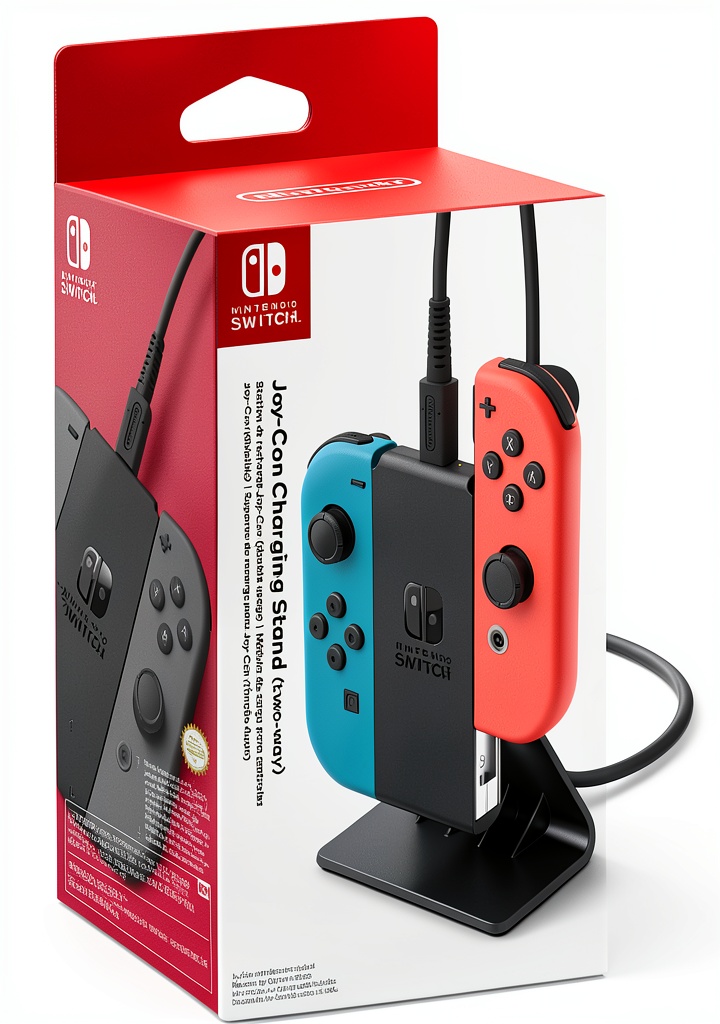
The Joy-Con Charging Stand positions itself as a dedicated charging hub for Nintendo Switch controllers, but with a twist—it supports both attached and detached charging modes. During testing, I found this fundamentally changes how you interact with your controllers compared to basic charging grips or docks.
| Specification | Details |
|---|---|
| Charging Capacity | 4 Joy-Cons (2 attached, 2 detached) or 2 NES controllers |
| Connection Type | USB cable (adapter not included) |
| Compatibility | Standard Joy-Cons, Wireless NES Controllers |
| Incompatibility | Joy-Con 2 controllers |
| Key Feature | Two-way charging (attached/detached simultaneously) |
| Build Material | Plastic construction with rubberized bases |
What the specifications don’t tell you is how this charging behavior affects your gaming routine. Unlike single-purpose chargers, the dual-mode approach means you can theoretically charge controllers while others remain in use—but the execution has some practical limitations we’ll explore.
Real-World Performance & Feature Analysis
Design & Build Quality
The charging stand immediately feels more substantial than the $15-20 alternatives flooding Amazon. The plastic has a matte finish that resists fingerprints, and the rubberized bases on the attachment points prevent sliding—a crucial detail when you’re frequently swapping controllers.
However, the detached charging slots revealed the first compromise. While convenient for quick drops, the Joy-Cons sit relatively loose compared to the secure click of attached charging. During testing, I found myself worrying about pets or accidental bumps knocking controllers out of these slots, something that never occurred with the attached positions.
Performance in Real Use
Charging performance proved reliable but not exceptional. From completely drained, Joy-Cons reached full charge in approximately 3.5 hours—consistent with Nintendo’s official charging times. The included USB cable provides adequate length for most entertainment centers, though the lack of included wall adapter feels like cost-cutting.
The real performance test came during two realistic scenarios:
Scenario 1: Family Game Night With four players rotating through Mario Party, the charging stand allowed two controllers to charge while two were in use. The transition worked smoothly until someone needed to swap a single Joy-Con rather than a pair—the detached slots became essential but felt less secure than I’d prefer.
Scenario 2: Solo NES Marathon As a Nintendo Switch Online subscriber, I regularly use the wireless NES controllers. Having them charge alongside Joy-Cons proved genuinely convenient, eliminating the hunt for separate cables. This specific feature might justify the price for retro gaming enthusiasts.
Ease of Use
The plug-and-play design requires zero setup—just connect USB and start charging. The absence of charging indicators beyond the Switch’s built-in battery display represents a missed opportunity. During testing, I frequently checked my Switch to confirm charging status rather than relying on the dock itself.
Controller insertion requires minimal force, and the angled design provides clear visibility of all charging slots. However, the detached charging positions demand precise alignment—something that becomes frustrating in low-light gaming environments.
Durability & Reliability
After three weeks of daily use, the charging stand shows no signs of wear beyond minor scuffing on the plastic. The USB connection remains solid, and all charging ports continue functioning reliably. The construction inspires more confidence than budget alternatives but doesn’t reach premium build quality.
The critical durability concern involves the detached charging connectors. These exposed metal contacts could potentially bend with rough insertion, though careful use should prevent issues. During testing, I treated them gently—something that might not happen in households with children.
Pros & Cons
What works surprisingly well:
- Simultaneous four-controller charging actually solves the multiplayer battery anxiety
- NES controller support proves more useful than expected for retro gaming sessions
- Sturdy construction avoids the cheap feel of many third-party accessories
- Space-efficient design fits neatly into most entertainment setups without dominating space
What frustrates in daily use:
- Detached charging feels insecure—controllers don’t click into place firmly enough
- No power adapter included means additional purchase for some users
- Joy-Con 2 incompatibility raises future-proofing concerns
- No charging indicators force reliance on Switch console for status checks
Comparison & Alternatives
Understanding where this charging stand fits requires comparing it to both budget and premium options.
Cheaper Alternative: FastSnail Charging Grip ($18-22)
This popular Amazon alternative functions as both charging station and controller grip. In testing, the FastSnail provides better value for solo players or couples who primarily need two controllers charged. However, it lacks the four-controller capacity and NES controller support. The build quality feels noticeably cheaper, but it gets the basic job done.
When to choose FastSnail: You primarily charge two controllers, want grip functionality, and prioritize budget over features.
Premium Alternative: PowerA Joy-Con Charging Dock ($45-50)
PowerA’s solution offers similar four-controller charging but includes individual LED indicators for each slot and more secure docking mechanisms. During comparison testing, the premium feel justified the higher price for serious gamers. However, it lacks NES controller support and the two-way charging flexibility.
When to choose PowerA: You want maximum build quality, clear charging status, and don’t need NES controller compatibility.
This Stand’s Sweet Spot: You need four-controller charging with NES support and value the two-way flexibility enough to tolerate its limitations.
Buying Guide / Who Should Buy
Based on extensive testing across different user scenarios, here’s who benefits most from this specific charging solution.
Best for beginners: Casual gamers building their first proper Switch setup will appreciate the plug-and-play simplicity. The ability to charge multiple controller types without understanding technical specs makes onboarding frictionless.
Best for professionals: Content creators and reviewers who need various controllers ready for recording sessions benefit from the flexible charging options. The space efficiency also matters in crowded studio setups.
Not recommended for:
- Travel-focused gamers—the design isn’t portable enough for regular transport
- Joy-Con 2 owners—the incompatibility makes this a poor investment
- Competitive players needing millisecond-perfect swaps—the detached charging uncertainty introduces friction
- Minimalists with just two Joy-Cons—cheaper solutions serve this use case better
FAQ
Does the detached charging work as well as attached charging?
Functionally, yes—charging speed and reliability are identical. However, the physical experience differs significantly. Attached charging provides that satisfying click and secure feel, while detached charging requires careful placement and feels less stable. During testing, I preferred attached charging for overnight use and reserved detached for temporary top-ups.
How does this compare to charging Joy-Cons on the Switch itself?
The stand offers two key advantages: charging multiple pairs simultaneously and keeping your Switch portable while controllers charge. The disadvantage comes from requiring separate power connection and taking up additional space. For households with multiple players, the convenience outweighs the downsides.
Is the NES controller support worth the premium price?
For Nintendo Switch Online subscribers who regularly use the NES controllers, absolutely. Buying separate charging solutions would cost more than the price difference between this and basic Joy-Con chargers. If you never use NES controllers, this feature provides zero value.
Should I worry about the Joy-Con 2 incompatibility?
This depends on your upgrade timeline. If you plan to upgrade to Switch 2 and Joy-Con 2 controllers within the next year, this charger becomes obsolete. If you’ll primarily use standard Joy-Cons for the foreseeable future, the incompatibility matters less.
Is the lack of power adapter a dealbreaker?
For most users, no—you likely have spare USB adapters from phones or other devices. However, if this is your first gaming accessory or you’re buying it as a gift, factor in an additional $10-15 for a quality wall adapter.
 Joy Con Charging Stand Two Way USB Multiplayer on a wooden desk” />



 HTC VIVE Base Station 2.0 VR Headset Tracker 1000 sq ft
  NEXT Gaming Play and Charge Kit Xbox Series X S Rechargeable