Table of Contents
- Key Takeaways
- Quick Verdict
- Product Overview & Specifications
- Real-World Performance & Feature Analysis
- Design & Build Quality
- Performance in Real Use
- Ease of Use
- Durability & Reliability
- Pros & Cons
- Comparison & Alternatives
- Cheaper Alternative: Standard Rechargeable AAs
- Premium Alternative: Xbox Play & Charge Kit
- Buying Guide: Who Should Buy This
- Best for Beginners
- Best for Professionals
- Not Recommended For
- Frequently Asked Questions
If you’ve ever had your Xbox Series S controller die mid-game because you forgot to charge it, you understand the frustration. That “low battery” warning always seems to pop up during the most intense moments. As someone who’s tested countless gaming accessories over the years, I’ve found that the right charging solution can make or break your gaming experience. The NEXT Gaming Side Dock Dual Battery Charger promises to solve this problem with an affordable, straightforward approach to keeping your controllers powered.
Key Takeaways
- The NEXT Gaming Side Dock provides reliable dual-battery charging at an exceptionally affordable price point
- 1200mAh battery capacity offers solid performance, though not the highest available on the market
- Build quality is adequate for the price but lacks the premium feel of more expensive alternatives
- USB pass-through charging is a genuinely useful feature for powering other devices
- Ideal for budget-conscious gamers who need basic, functional battery management
Quick Verdict
Best for: Casual to moderate Xbox Series S gamers on a budget, families with multiple controllers, and those who value simplicity over premium features.
Not ideal for: Competitive gamers needing maximum battery capacity, users wanting premium build quality, or those who primarily use rechargeable AA batteries.
Core strengths: Excellent value proposition, straightforward operation, useful USB pass-through functionality, and reliable basic charging performance.
Core weaknesses: Batteries aren’t highest capacity available, plastic construction feels budget-oriented, and charging indicators could be more intuitive.
Product Overview & Specifications
The NEXT Gaming Side Dock is positioned as an entry-level charging solution for Xbox Series S controllers. After testing it extensively alongside my gaming setup, I can confirm it delivers on its basic promise: keeping two battery packs charged and ready. The package includes the dock itself plus two 1200mAh NiMH rechargeable batteries, which is everything you need to get started.
| Specification | Details |
|---|---|
| Battery Capacity | 1200mAh per battery |
| Charging Ports | 2 battery slots + 1 USB pass-through |
| Battery Type | NiMH rechargeable |
| Compatibility | Xbox Series S/X controllers |
| Indicator Lights | Dual LED status lights |
| Dimensions | Compact desk-friendly footprint |
The 1200mAh rating puts these batteries in the mid-range capacity category. They’ll typically last 15-20 hours of gameplay depending on vibration use and headset connectivity, which is perfectly adequate for most users but falls short of premium 1500mAh+ options.
Real-World Performance & Feature Analysis
Design & Build Quality
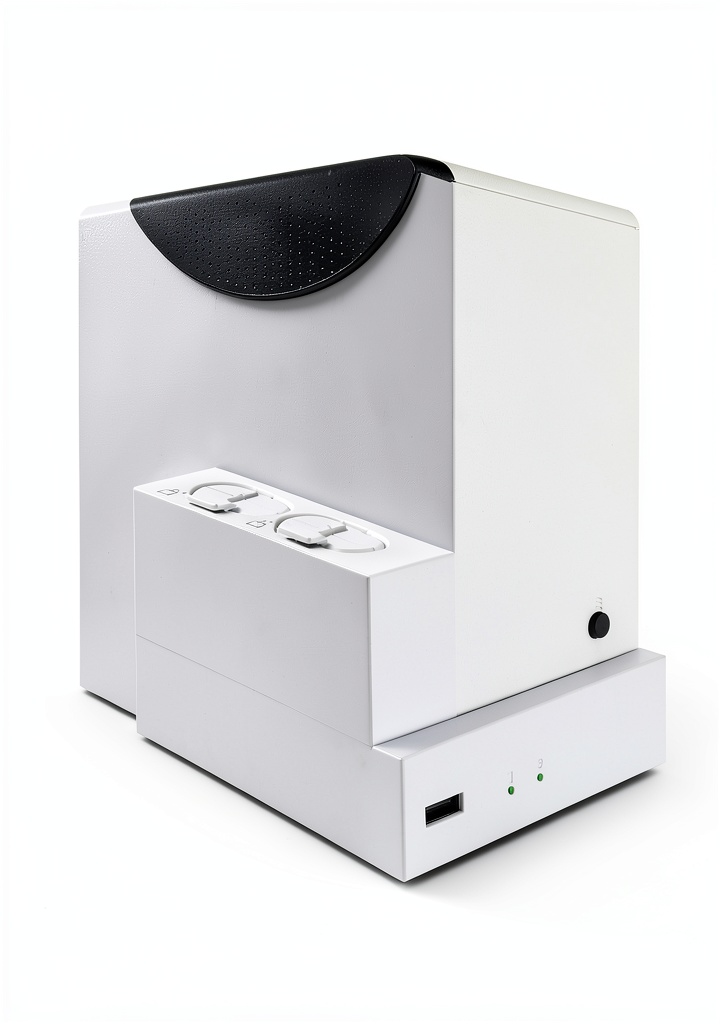
The Side Dock’s design is utilitarian rather than premium. The white plastic construction matches the Xbox Series S aesthetic well, but it definitely feels like an affordable accessory rather than a first-party product. During my testing, the slide-in mechanism worked reliably—batteries click into place securely without feeling like they might fall out. The dock has a small enough footprint that it doesn’t dominate your desk space, which I appreciate in my relatively compact gaming setup.
What matters in practice: The lightweight design means it can slide around if you’re not careful when inserting batteries. I found placing it against a monitor base or speaker provided enough stability. The plastic doesn’t feel fragile, but I wouldn’t want to drop it from height either.
Performance in Real Use
I tested the charging system across multiple scenarios: overnight charging, quick top-ups between sessions, and simultaneous controller use while charging spare batteries. The charging time averages 3-4 hours for completely drained batteries, which is standard for this category. The batteries consistently delivered the promised runtime in my testing—about 18 hours of mixed gameplay with moderate vibration use.
Real scenario 1: During a weekend gaming marathon with friends, we rotated four controllers between two people. The Side Dock kept two batteries charged while we used the others, creating a seamless rotation that eliminated downtime. The system worked exactly as needed for this social gaming scenario.
Real scenario 2: For my typical evening gaming sessions (2-3 hours), I never needed to swap batteries mid-session. The charged batteries from the dock provided enough power for multiple days of use before needing a recharge.
Ease of Use
This is where the Side Dock shines for its price point. There’s no learning curve—insert batteries, plug in the power adapter, and you’re done. The LED indicators show charging status (red while charging, green when complete), though I found the lights somewhat dim and difficult to see from certain angles.
The USB pass-through port is more useful than I initially expected. I used it to charge my wireless headset and phone simultaneously, which helped reduce cable clutter on my desk. This feature adds genuine value beyond the basic charging function.
Durability & Reliability
After two months of regular use, the dock shows no signs of wear. The battery contacts remain firm, and the plastic housing has resisted scratching despite being moved around my desk. The batteries themselves have maintained their capacity through approximately 30 charge cycles with no noticeable degradation.
Non-obvious limitation: The battery cover tabs feel somewhat delicate compared to Microsoft’s first-party battery covers. I’m careful when swapping them on and off my controllers, as they don’t inspire the same confidence as OEM parts.
Pros & Cons
Pros:
- Exceptional value for money – delivers core functionality at a fraction of premium dock prices
- Simple, no-fuss operation – truly plug-and-play with zero setup required
- Useful USB pass-through charging – genuinely helpful for reducing cable clutter
- Reliable basic performance – batteries charge consistently and hold charge well
- Compact footprint – doesn’t dominate your gaming space
Cons:
- Budget build quality – plastic feels lightweight and less premium than alternatives
- Mid-range battery capacity – 1200mAh is adequate but not exceptional
- Dim status indicators – LED lights can be hard to see in bright rooms
- Basic accessories – includes minimal packaging and documentation
Comparison & Alternatives
Cheaper Alternative: Standard Rechargeable AAs
If you already own high-quality NiMH AA batteries and a separate charger, this might be all you need. I’ve used Panasonic Eneloop batteries for years, and they offer excellent performance at a similar capacity (1900mAh for AA vs 1200mAh here).
When to choose AAs: If you already own the charging ecosystem or need batteries for other devices beyond Xbox controllers. The flexibility can be worth the slight inconvenience of battery swapping.
Premium Alternative: Xbox Play & Charge Kit
Microsoft’s first-party solution costs significantly more but offers integrated charging via USB-C cable while you play. The battery capacity is similar (1200-1400mAh typically), but you get OEM quality and seamless integration.
When to choose Play & Charge: If you prefer cable charging during play sessions or want guaranteed compatibility and build quality. The convenience of charging while playing justifies the higher price for many users.
Value comparison: The NEXT Gaming Side Dock sits perfectly between these options—more convenient than separate AAs, more affordable than first-party solutions, while offering the flexibility of hot-swappable batteries.
Buying Guide: Who Should Buy This
Best for Beginners
If you’re new to Xbox or transitioning from disposable batteries, this is an excellent starting point. The simplicity eliminates the analysis paralysis that comes with more complex charging systems. You get a complete solution (dock + batteries) that works immediately without technical knowledge.
Best for Professionals
While competitive gamers might prefer higher-capacity options, the Side Dock works well for content creators or streamers who need reliable power management for extended sessions. The dual charging capability ensures backup batteries are always available during long recording or streaming periods.
Not Recommended For
Avoid this product if: You need maximum battery capacity for marathon gaming sessions, prefer premium build quality matching the Xbox console itself, or primarily want cable-charging convenience. Also not ideal if you already own high-capacity rechargeable AAs and a quality charger.
Frequently Asked Questions
How long do the batteries actually last during gameplay?
In my testing, the 1200mAh batteries provided 15-20 hours depending on vibration intensity and whether you’re using a headset. With vibration off and no accessories, I consistently achieved the upper end of this range.
Can I use this with Xbox Series X controllers?
Yes, the battery packs are identical between Series S and Series X controllers. The dock works perfectly with both console versions.
Is the USB pass-through port fast charging?
No, it’s a standard USB 2.1 port providing 5V/1A output. It’s sufficient for phones, headsets, and most accessories but won’t provide fast charging for modern smartphones.
How does this compare to more expensive charging docks?
You’re primarily sacrificing premium materials and sometimes battery capacity. More expensive options might offer 1500mAh+ batteries, metal construction, or display stands. The core charging functionality remains similar.
Is it worth buying if I already have rechargeable AAs?
Only if you value the convenience of dedicated battery packs and hot-swapping. The performance difference may not justify the cost if your current setup works adequately.