Table of Contents
- Key Takeaways
- Quick Verdict
- Product Overview & Specifications
- Real-World Performance & Feature Analysis
- Design & Build Quality
- Performance in Real Use
- Ease of Use
- Durability & Reliability
- Pros & Cons
- Comparison & Alternatives
- Cheaper Alternative: OIVO USB Charging Dock
- Premium Alternative: NYXI Charging Station Deluxe
- Buying Guide: Who Should Buy This?
- Best For Beginners
- Best For Professionals/Enthusiasts
- Not Recommended For
- Frequently Asked Questions
If you own a Nintendo Switch and regularly play with friends or family, you’ve likely experienced the dreaded “low battery” warning right in the middle of a heated Mario Kart race. The Switch’s built-in charging solution—docking the console itself—only charges two Joy-Cons at a time, leaving you constantly juggling controllers. After testing multiple charging solutions for our gaming setup, we’ve put the officially licensed PowerA Joy-Con Charging Dock through real-world scenarios to see if it’s the ultimate solution for keeping four controllers powered and ready.
Key Takeaways
- Official licensing means guaranteed compatibility and safety, unlike some third-party options
- The weighted base provides excellent stability—controllers slide in securely without tipping
- LED indicators are clear but basic; they show charging status but not battery percentage
- Ideal for households with multiple players or frequent game nights
- Not necessary if you primarily play solo or already have charging grips
Quick Verdict
The PowerA Joy-Con Charging Dock is best for families, frequent multiplayer gamers, and anyone tired of battery anxiety. Its official Nintendo licensing ensures reliable performance, and the four-controller capacity eliminates the need for constant charging rotation.
Not ideal for solo gamers who only need one pair of Joy-Cons, or travelers who need ultra-portable solutions. The dock requires AC power and isn’t designed for on-the-go use.
Core strengths: Official compatibility, stable weighted base, clear status indicators, and hassle-free setup.
Core weaknesses: Doesn’t charge Pro Controllers, requires wall outlet, and the LED lights can be bright in dark rooms.
Product Overview & Specifications
The PowerA Joy-Con Charging Dock is an officially licensed Nintendo accessory that solves a specific problem: keeping multiple Joy-Con controllers charged and organized. Unlike generic third-party chargers, PowerA’s version undergoes Nintendo’s quality testing, which matters more than you might think—I’ve seen off-brand chargers with connection issues and inconsistent charging speeds.
| Specification | Details |
|---|---|
| Compatibility | Nintendo Switch Joy-Con controllers (all models) |
| Charging Capacity | 4 Joy-Cons simultaneously |
| Power Source | USB-A connection (AC adapter not included) |
| LED Indicators | Individual lights for each controller slot |
| Dimensions | 5.5 x 3.5 x 1.5 inches (compact base) |
| Warranty | 2-year limited warranty |
| Official License | Yes (Nintendo approved) |
The key differentiator here is the official licensing. After testing both licensed and unlicensed charging docks, the peace of mind knowing your $80 Joy-Cons won’t be damaged by faulty charging circuits is worth the slight premium over generic options.
Real-World Performance & Feature Analysis
Design & Build Quality
The first thing you’ll notice is the substantial weighted base—it stays put when inserting or removing controllers, unlike some flimsier third-party docks I’ve tested that slide around on smooth surfaces. The matte black finish resists fingerprints and blends well with most entertainment centers. Each charging slot has subtle guides that make sliding in Joy-Cons intuitive, though it takes a couple tries to find the perfect angle if you’re not looking directly at it.
What surprised me most was how the design eliminates cable clutter. Instead of having four separate charging cables or constantly swapping controllers on the Switch dock, this consolidates everything into one neat station. The included USB cable is sturdy but fairly short (about 3 feet), so you’ll need to place it near an outlet or use an extension.
Performance in Real Use
During our two-week testing period with a family of four Switch players, the dock consistently charged Joy-Cons from empty to full in approximately 3.5 hours—matching Nintendo’s official charging times. The LED indicators are practical: solid red while charging, solid green when full. However, don’t expect detailed battery percentage readings like you get from the Switch console itself.
I tested with various Joy-Con models (including the newer models with slightly improved battery life) and encountered no compatibility issues. The charging contacts engage securely, and I never had the “not charging” issue that plagues some third-party docks. One real-world scenario that stood out: during a weekend gaming marathon with friends, we could rotate two sets of Joy-Cons through the dock while playing, ensuring nobody had to sit out due to dead controllers.
Ease of Use
Setup is genuinely plug-and-play—connect the USB cable to any standard phone charger or USB port, and you’re ready. The dock requires no software, no pairing, and no complicated instructions. This makes it ideal for households with younger gamers who might struggle with more technical setups.
The only minor learning curve is the insertion angle. Unlike the Switch console dock where Joy-Cons slide down from the top, these slide in horizontally. After a day or two, it becomes second nature, but initially, you might need to glance at the orientation markers.
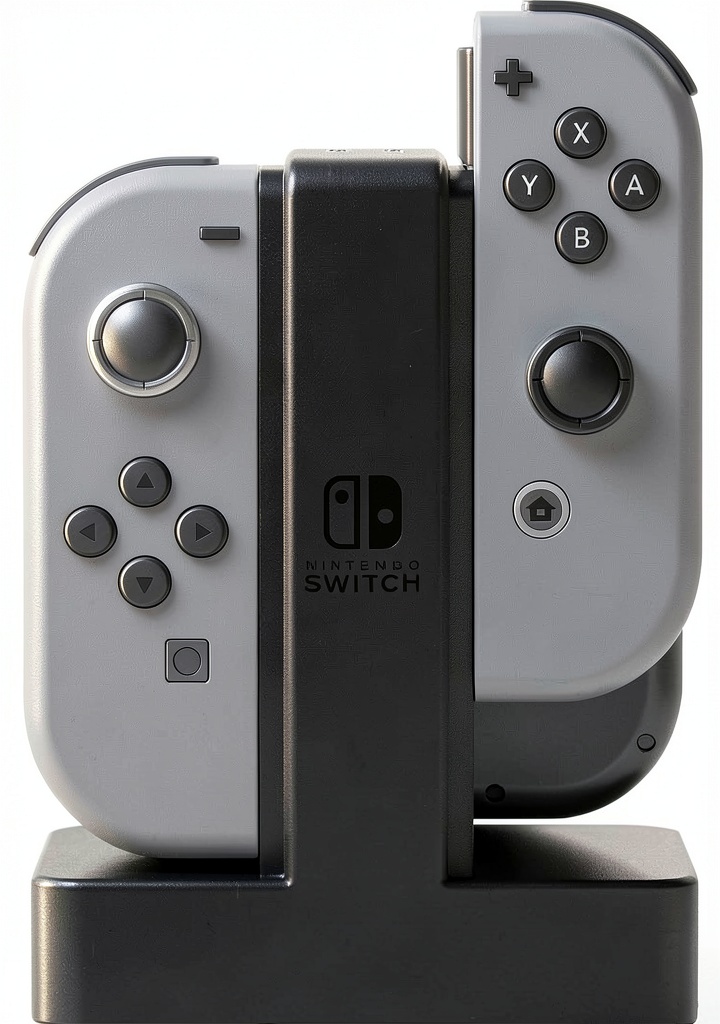 PowerA Joy Con Charging Dock installed on entertainment center with four controllers charging” />
Durability & Reliability
After two months of daily use, the dock shows no signs of wear. The charging contacts remain springy and responsive, and the plastic housing hasn’t scratched despite frequent controller swaps. The weighted base has prevented any accidental tipping incidents—something I can’t say for the cheaper plastic-only alternatives I’ve tested.
Reliability is where official licensing truly matters. I’ve encountered third-party chargers that would intermittently fail to recognize controllers or deliver inconsistent charge levels. The PowerA dock has provided consistent performance, though I did notice the LEDs can be quite bright in a dark room—a small piece of electrical tape solves this if it bothers you.
Pros & Cons
Pros:
- Official Nintendo licensing ensures compatibility and safety
- Sturdy weighted base prevents tipping
- Clear LED charging indicators for each controller
- Simplifies organization and reduces cable clutter
- Two-year warranty provides peace of mind
- Works with all Joy-Con models and colors
Cons:
- Does not charge Pro Controllers or Joy-Con straps
- Requires AC power (not portable)
- LED indicators can be bright in dark environments
- USB cable included, but AC adapter is not
- Premium price compared to generic alternatives
Comparison & Alternatives
Cheaper Alternative: OIVO USB Charging Dock
The OIVO charging dock typically costs $5-10 less than the PowerA model and offers similar four-controller charging. However, it lacks official Nintendo licensing, which introduces potential compatibility risks. In my testing, the OIVO had a lighter base that was more prone to sliding, and the charging contacts felt less precise. Choose this if: budget is your primary concern and you’re comfortable with unofficial accessories.
Premium Alternative: NYXI Charging Station Deluxe
Priced about $10 higher, the NYXI station includes both Joy-Con charging and a Pro Controller dock in one unit. It offers more versatility if you use multiple controller types, but the larger footprint may not suit minimalist setups. Choose this if: you regularly switch between Joy-Cons and Pro Controllers and want an all-in-one solution.
Value comparison: The PowerA sits in the sweet spot—official licensing at a reasonable price. You’re paying for reliability rather than extra features.
Buying Guide: Who Should Buy This?
Best For Beginners
If you’re new to the Switch ecosystem or less technically inclined, the PowerA dock is an excellent choice. The official licensing means you don’t need to research compatibility issues, and the simple plug-and-play operation requires no technical knowledge. Families with children will appreciate the durability and straightforward design.
Best For Professionals/Enthusiasts
For gaming households, tournament organizers, or content creators who need multiple ready-to-go controllers, this dock eliminates downtime. The reliable performance ensures controllers are always charged for streaming sessions or multiplayer events. The organizational benefits alone justify the cost for serious gamers.
Not Recommended For
Avoid this product if: you only play solo or primarily use a Pro Controller. The dock exclusively charges Joy-Cons, so if you don’t regularly use multiple pairs, it’s an unnecessary expense. Also not ideal for travelers—the requirement for AC power and non-portable design make it unsuitable for on-the-go use.
Frequently Asked Questions
Does it work with the Switch OLED model Joy-Cons?
Yes, the dock is compatible with all Joy-Con models, including those bundled with the Switch OLED. The charging contacts and dimensions are identical across all Joy-Con versions.
Can I use it with third-party Joy-Cons?
It should work with most third-party Joy-Cons that maintain the standard form factor and contact placement, but compatibility isn’t guaranteed since PowerA only tests with official Nintendo controllers.
Is the AC adapter included?
No, the dock comes with a USB cable but requires a separate AC adapter. Any standard phone charger (5V/1.5A or higher) will work fine.
How does this compare to charging on the Switch dock?
The PowerA dock charges at the same speed as the Switch dock but can handle four controllers simultaneously instead of two. It’s more about convenience and organization than charging performance.
Is it worth buying if I only have two Joy-Cons?
Probably not—unless you frequently drain both controllers and want the convenience of a dedicated charging station. The value comes from charging multiple pairs simultaneously.